Last year, I introduced you to the new vector feature in Db2. First, I showed you how to perform similarity search, then explained how to use vector functionality for geo(-spatial) queries. Now, I switched example for similarity search to an interesting use case, performing research on ETFs (Exchange-traded funds), or mutual funds in general.
Exchange-traded funds
Many people use ETFs for retirement savings, often without looking into details. An ETF can have many properties, including the market sectors, geographic focus, asset and industry types, risk level, and many more. So, knowing one specific ETF, how do you find similar ETFs? Well, use similarity search…
To get some reasonable data to work with, I utilized the Python package yfinance. It allows to download fund information based on the ticker symbol. Having some sample data, next was to ask IBM Bob to generate some synthetic data. You can find it in the file etfs_data_1000.csv in my GitHub repository with the Db2 vector examples.
Vector queries on ETFs
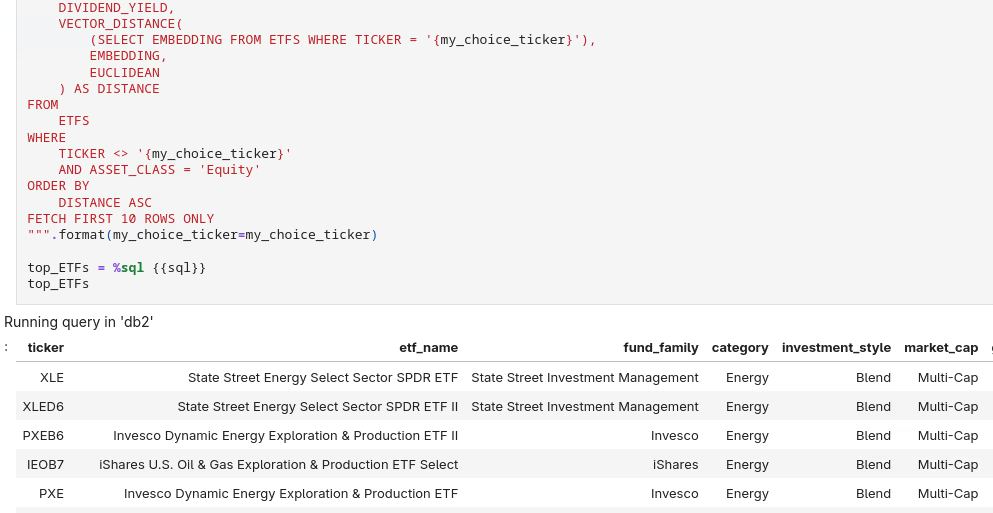
Similar to the earlier example with shoes for product search, the Jupyter notebook for the ETF queries has all the setup and queries included. Again, I am utilizing a local ollama with an IBM Granite embedding model to turn ETF properties into vector embeddings that are then stored in Db2.
Of course, you can also perform “traditional” filter operations in the WHERE clause to specify which type of ETF to select. See the notebook for details and adapt it to your preferences.
Conclusions
Db2 has a built-in vector data type since version 12.1.2. See my GitHub repository for the Db2 vector functionality for code samples and useful links.
If you have feedback, suggestions, or questions about this post, please reach out to me on Mastodon (@data_henrik@mastodon.social) or LinkedIn.