In my last blog post on Financial research using Db2 vector capabilities, I discussed how to utilize the vector capabilities in Db2 for looking for specific exchange-traded funds (ETFs). Similar to earlier examples, I encoded the vector embeddings with ollama by calling a function from its Python SDK. It worked ok in my scenario, a Jupyter notebook with Python and SQL code for Db2. But vector encodings were all computed outside of Db2 and the SQL context. So how would I write more complex queries?
That’s what a new Db2 feature, so far only available as part of the Db2 Early Access Program (EAP), is addressing. Under the topic of “Large language model integration with Db2”, it’s possible to register AI models and their inferencing API endpoints with Db2, manage usage authorization, and call out to the models for generating embeddings or text. The models are available as database objects with their DDL and DML operations, including catalog metadata. Let’s take a closer look…
Use External Models with Db2 SQL
At its core, the new feature consists of the DDL statement to register an AI model and its inferencing endpoint and two new scalar functions TO_EMBEDDING and TEXT_GENERATION:
CREATE EXTERNAL MODEL model-name PROVIDER {WATSONX watsonx-clauses | OPENAI openai-clauses}
The above creates the database object with API details for either IBM watsonx.ai or the OpenAI REST API. In my tests, I have worked with the OpenAI API which is provided by tools like ollama, the core behind Llama.cpp, and others. Details include the endpoint URL and credentials, the exact model and performance- and behavior-related configurations, most of them optional.
The functions are similar in that they take a string and the model name as input and return either a vector (TO_EMBEDDING) or the generated text (TEXT_GENERATION).
TO_EMBEDDING(string-expression USING model-name)
TEXT_GENERATION(string-expression USING model-name)
Additional functionality is provided by ALTER/DROP statements, GRANT/REVOKE for either USAGE or ALTER privileges, TRANSFER OWNERSHIP, and related catalog views. Right now you have to sign up for the Db2 Early Access Program if interested in details.
External model in action
In my previous blog post about similarity search for ETFs, I had pointed to this Jupyter notebook with all the steps for setup, search, and cleanup. In two of the notebook cells it includes a line like the following:
response = ollama.embed(model=EMBEDDING_MODEL, input=row_combined)
Those lines are required for encoding the embeddings. Those computations are performed from the Python environment, outside of Db2. The notebook requires a import ollama and some configuration for the above ollama.embed to work.
The newer Jupyter notebook utilizing Db2 external models does not require the ollama module at all. It assumes that the IBM Granite Embedding model was registered in the database:
create external model granollama
provider openai id 'granite-embedding' url 'http://localhost:11434/v1/embeddings'
type text_embedding returning vector (384, float32) key 'ollama';
In the notebook itself, you can see SQL code sections like the following two. The first is an UPDATE statement with a call to TO_EMBEDDING to create the vector encodings.
update etfs set embedding=TO_EMBEDDING('ASSET_CLASS:'|| asset_class||' [SEP] CATEGORY:'||category||' [SEP] INVESTMENT_STYLE:'||investment_style||' [SEP] MARKET_CAP:'||market_cap|| ' [SEP] GEOGRAPHIC_FOCUS:'||geographic_focus||' [SEP] RISK_LEVEL:'||risk_level using granollama)
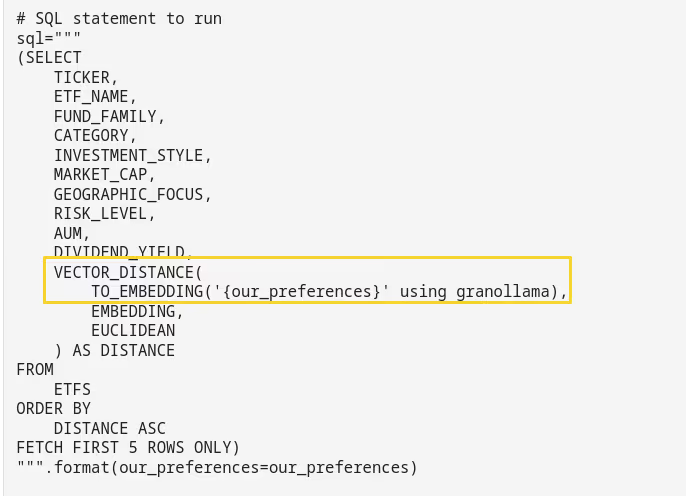
The second statement is a SELECT which directly encodes search parameters using TO_EMBEDDING, then performes the similarity search using VECTOR_DISTANCE.
# SQL statement to run
sql="""
(SELECT
    TICKER,
    ETF_NAME,
    FUND_FAMILY,
    CATEGORY,
    INVESTMENT_STYLE,
    MARKET_CAP,
    GEOGRAPHIC_FOCUS,
    RISK_LEVEL,
    AUM,
    DIVIDEND_YIELD,
    VECTOR_DISTANCE(
        TO_EMBEDDING('{our_preferences}' using granollama),
        EMBEDDING,
        EUCLIDEAN
    ) AS DISTANCE
FROM
    ETFS
ORDER BY
    DISTANCE ASC
FETCH FIRST 5 ROWS ONLY)
""".format(our_preferences=our_preferences)
Conclusions
Db2, as technical preview, already has the capability to integrate inferencing into the SQL context. All that is required is to register the external model with Db2, grant privileges, then call TO_EMBEDDING or TEXT_GENERATION. I am looking forward to the next Db2 modpack when embeddings are fully embedded into the SQL context…
If you have feedback, suggestions, or questions about this post, please reach out to me on Mastodon (@data_henrik@mastodon.social) or LinkedIn.
