In my recent blog post about interacting with LLMs from SQL with external models in Db2, I mentioned the Db2 Early Access Program (EAP). The EAP provides a preview on upcoming Db2 features. Db2 added vector support in version 12.1.2. What is still missing, is the ability to index vector data. That’s something in the development pipeline and made available in recent Db2 EAP releases. In today’s blog post, I am going to give you an introduction to vector indexes in Db2, share my test setup, and some (early) observations.
The need for speed: Db2 Vector Indexes
When working with vector data (or by reading some of my previous blog posts like Db2 vector for similarity search, Setup for Db2 vector for similarity search, or Financial research using Db2 vector capabilities), you know that vector data is highly dimensional, likely sparse, and there is plenty of such data. Thus, performing a scan (brute force, going through all of the data), does not perform and scale well. Hence, often, some form of approximation is applied, searching for the approximate nearest neighbors (ANN) of the desired exact results. The quality of such approximate search results is named “recall” and is the ratio of retrieved (R) to the total (T) relevant items.
As part of the vector index feature, Db2 introduces new keywords to the FETCH FIRST n ROWS ONLY clause:
- FETCH EXACT: It means to perform a scan through all the data and retrieve the exact result set.
- FETCH APPROX: In this case, an approximation may be used and the result might not match the exact result.
- FETCH: If you don’t specify whether APPROX or EXACT should be used, then it’s Db2’s choice.
By comparing the results of the exact and approximate search, you can compute the recall factor, the quality. To create the actual index, a new statement is needed:
CREATE VECTOR INDEX index_name ON table_name(column_name) WITH DISTANCE distance_type.
There are many more clauses and keywords. They can be used to place the index data into dedicated tablespace(s), to determine physical properties and the way the index is built.
Similar to BTrees for relational indexes, there has been DiskANN by Microsoft as a family of vector indexing techniques. It tries to keep most index data on index while performing ANN searches. The Db2 vector index seems to fall into the DiskANN family.
When looking into the Db2 catalog data at SYSCAT.INDEXES, you will find a new INDEXTYPE VANN. Here is a query performed over my test setup:
select indname from syscat.indexes where indextype='VANN'"

INDNAME
--------------------------------------------------------------------------------------------------------------------------------
ETFS_IDX_EMBEDDINGS
CITYINDEX
V_RANDOM24_INDEX
V_RANDOM72_INDEX
V_RANDOM_INDEX

  5 record(s) selected.
Tested: Db2 Vector Indexes
To test vector indexes in Db2, first, I needed vector data, lots of it. Therefore, I wrote some common table expressions (CTEs) to generate vector data. In my GitHub repository for Db2 vector examples, you can find my SQL scripts for the setup, the tested queries, and the explain plans for those queries. It is good to know that all the regular performance tools work with vector data and vector indexes.
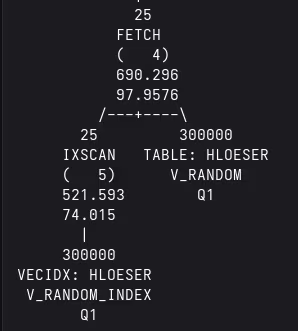
For my tests, I ran the setup script to create a table, generate and insert data, then create the vector index and perform RUNSTATS. Thereafter, I evaluated the queries included in the GitHub repository and many more. In the following, you can find two queries with their associated access plan as produced by EXPLAIN. The index scan (IXSCAN) labels the vector index as VECIDX. The most important lesson learned / observation is that vector indexes are only utilized if the vector column has the NOT NULL property.
- Find neighbors to a three-dimensional data point. Because of the small amount of records and dimensions, I had to use optimizer guidelines for Db2 to actually use the vector index. See the query r3.sql and the explain output r3.sql.explained on GitHub.
SELECT
  id,
  VECTOR_DISTANCE(v, vector('[-1.02,0.95, 1.55]', 3, float32), EUCLIDEAN) AS DISTANCE
FROM
  v_random
ORDER BY
  DISTANCE ASC
FETCH approx FIRST 200 ROWS ONLY /* <OPTGUIDELINES> <IXSCAN TABLE='V_RANDOM' INDEX='V_RANDOM_INDEX'/> </OPTGUIDELINES> */
Access Plan:
-----------
	Total Cost: 		3200.97
	Query Degree:		1


             Rows
            RETURN
            (   1)
             Cost
              I/O
              |
              200
            TBSCAN
            (   2)
            3200.97
            664.229
              |
              200
            SORT
            (   3)
            3200.97
            664.229
              |
              200
            FETCH
            (   4)
            3200.93
            664.229
          /---+----\
        200        300000
      IXSCAN   TABLE: HLOESER
      (   5)      V_RANDOM
      2628.53        Q1
      373.01
        |
      300000
 VECIDX: HLOESER
  V_RANDOM_INDEX
        Q1
- This is a query over my table with 24 dimensions and hence more data. Db2 picks the vector index automatically. Check out the files r24_nested.sql and r24_nested.sql.explained on GitHub.
SELECT
  id,
  VECTOR_DISTANCE(v,
                  (SELECT
                     v
                   from
                     v_random24
                   FETCH FIRST 1 ROWS ONLY
                  ), EUCLIDEAN) AS DISTANCE
FROM
  v_random24
WHERE
  V IS NOT NULL
ORDER BY
  DISTANCE ASC
FETCH approx FIRST 10 ROWS ONLY
Access Plan:
-----------
	Total Cost: 		498.673
	Query Degree:		1


               Rows
              RETURN
              (   1)
               Cost
                I/O
                |
                10
              TBSCAN
              (   2)
              498.673
              75.5862
                |
                10
              SORT
              (   3)
              498.673
              75.5862
                |
                10
              NLJOIN
              (   4)
              498.671
              75.5862
         /------+-------\
        1                 10
     TBSCAN             FETCH
     (   5)             (   6)
     2526.83            491.622
      2099              69.7304
       |              /---+----\
     600000         10         600000
 TABLE: HLOESER   IXSCAN   TABLE: HLOESER
   V_RANDOM24     (   7)     V_RANDOM24
       Q1         421.312        Q4
                  59.7519
                    |
                  600000
             VECIDX: HLOESER
             V_RANDOM24_INDEX
                    Q4
Conclusions
Vector indexes provide a performance boost to similarity searches over vector data. Similar (pun intended!) to other implementations, the Db2 vector index is based on approximate nearest neighbor search and the DiskANN algorithm. Once I had added NOT NULL to my vector column, my tests started to work and it was fun. I have more to test and more to write…
If you have feedback, suggestions, or questions about this post, please reach out to me on Mastodon (@data_henrik@mastodon.social) or LinkedIn.
