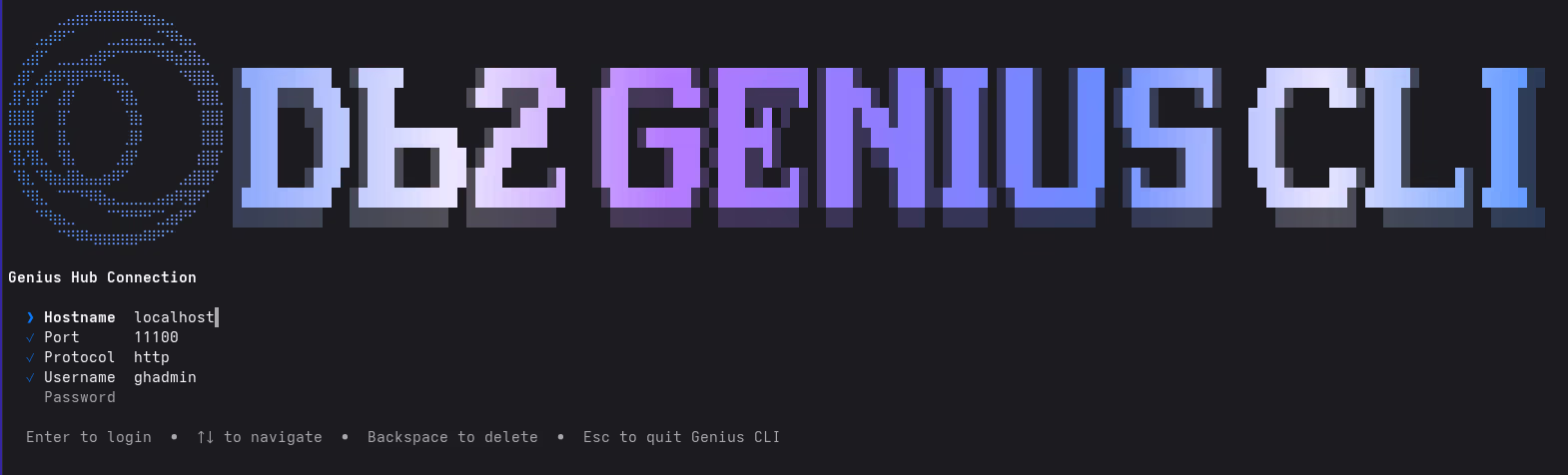
In April, I asked you whether you already had worked with or installed IBM Db2 Genius Hub. Since then, several releases werde made available. At the moment, the latest is Db2 Genius Hub 1.1.5.0. As with every release, it brings a couple new features. To me, the most notable is the Db2 Genius CLI.
Db2 Genius CLI is a terminal client for Db2 Genius Hub. It allows to perform many actions on the command line in the (UNIX / Linux) shell. I recommend reading the blog post Genius CLI: AI-Powered Db2 Intelligence, Right in Your Terminal on the IDUG website, written by some of the CLI developers. It walks you through the features and provides background details.
Genius CLI configuration
In order to connect the Db2 Genius CLI to the actual Db2 Genius Hub, you need to provide information like the hostname, port, protocol, and user credentials. That information needs to be either typed in or could be passed in through environment variables (some improvements possible 😎).
What I did, is to create a local env/text file with the following content.
export GENIUS_HUB_HOSTNAME=localhost;
export GENIUS_HUB_PORT=11100;
export GENIUS_HUB_PROTOCOL=http;
export GENIUS_HUB_USERNAME=ghadmin;
Then, I used the following command to start Db2 Genius CLI, to be greeted by the screen shown on top of this post. Notice how the most parts of the configuration, except the password, are already prefilled.
source ~/.config/db2/ghenvs/ghcli.env1;geniuscli
Instead of using the command above, I could have defined an alias.
Conclusions
That’s all for today. I hope to see many of you at IDUG EMEA 2026 in Porto.
If you have feedback, suggestions, or questions about this post, please reach out to me on Mastodon (@data_henrik@mastodon.social) or LinkedIn.
