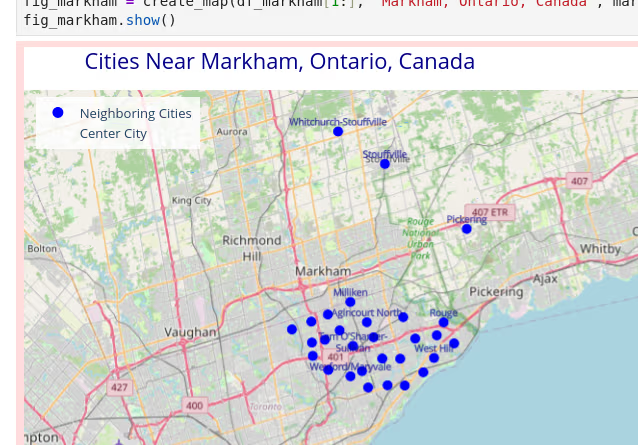
Over the past days, I got back to using the vector feature in Db2 for geographic search. What would happen, so I asked myself, when instead of just latitute and longitude I would use population as a third dimension? How would the similarity search turn out? The experiments proofed to be quite interesting. And it turned the focus on the aspect that the way embeddings are generated, turning objects into vector data, has a significant impact on result quality and usefulness.
Not all cities are equal or similar
The screenshot above shows Markham, Ontaria, Canada and its surrounding cities as found by a basic similarity search in Db2. The vector consists of the latitude and longitude. All neighbors, regardless of city size, are returned. Here is the same query with the result shown for Munich in Germany:
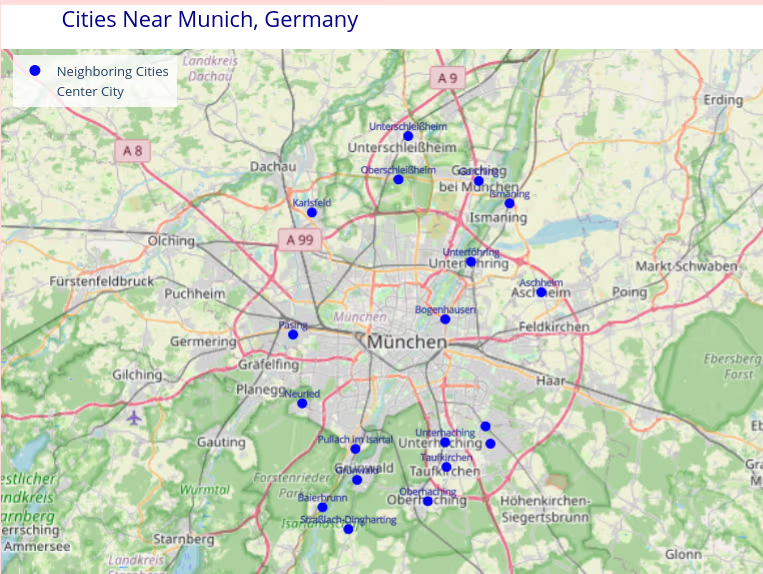
Munich is significantly larger than its direct neighbors, both in area and population size. So, could we add population as third dimension to the vector and use VECTOR_DISTANCE to find cities with a similar population as neighbors to Munich?
Naive approach
I started my experiments with the naive approach. I made up the vector of latitude, longitude, population. Later, I used 1/10 of the population, but the result did not change. Maybe (un-)suprising, using vector distance to find similar cities to Munich, ordered by distance, returned the following:
NAME                                                         COUNTRY                        POPULATION  DISTANCE
------------------------------------------------------------ ------------------------------ ----------- ------------------------
Munich                                                       Germany                            2606021   +0.00000000000000E+000
Gulou                                                        China                              2606000   +1.09974954638774E+002
Attadappa                                                    India                              2615266   +9.26908497906217E+002
Birmingham                                                   United Kingdom                     2590363   +1.56606401538943E+003
Valencia                                                     Venezuela                          2585202   +2.08386580708759E+003
Damascus                                                     Syria                              2584771   +2.12519420984858E+003
Chattogram                                                   Bangladesh                         2581643   +2.43945711888750E+003
Zibo                                                         China                              2631647   +2.56423677079286E+003
Huai’an                                                      China                              2632788   +2.67819961677703E+003
Weifang                                                      China                              2636154   +3.01494188943090E+003
Longyan                                                      China                              2640000   +3.39971378910805E+003
Baotou                                                       China                              2650364   +4.43509760476645E+003
Brazzaville                                                  Congo (Brazzaville)                2557100   +4.89228206759222E+003
Yangjiang                                                    China                              2555600   +5.04306815654393E+003
Chaozhou                                                     China                              2656600   +5.05914994030683E+003
Maracaibo                                                    Venezuela                          2658355   +5.23379586785489E+003
Sanaa                                                        Yemen                              2545000   +6.10217534491475E+003
Shanwei                                                      China                              2672819   +6.67985465432196E+003
Gāzipura                                                     Bangladesh                         2674697   +6.86749503505122E+003
Barmhān Kalān                                                India                              2537000   +6.90233374714442E+003

  20 record(s) selected.
With latitude and longitude having rather small values compared to population, there is an overemphasis on the latter (“bias towards population equality”?). Results are close to the actual population of Munich, but no longer are geographically close.
Would we need to transform (or encode) population before creating the vectors? Let’s give it a try…
Population control, sort of
In my next steps, I first applied square root (SQRT) to the population data. Later, I utilized the natural logarithm (LN).
Below are the returned cities for SQRT(). They are geographically closer to Munich, but still “all over the world”. The number of residents is still close to Munich’s population:
NAME                                                         COUNTRY                        POPULATION  DISTANCE
------------------------------------------------------------ ------------------------------ ----------- ------------------------
Munich                                                       Germany                            2606021   +0.00000000000000E+000
Birmingham                                                   United Kingdom                     2590363   +1.49696789337801E+001
Damascus                                                     Syria                              2584771   +2.94775581209598E+001
Hamburg                                                      Germany                            2496600   +3.47149959809833E+001
Rome                                                         Italy                              2748109   +4.38807439818582E+001
Sanaa                                                        Yemen                              2545000   +5.00138998365395E+001
Brazzaville                                                  Congo (Brazzaville)                2557100   +5.46955119796239E+001
Stuttgart                                                    Germany                            2787724   +5.53858301721772E+001
Bucharest                                                    Romania                            2412530   +6.28987131188135E+001
Beirut                                                       Lebanon                            2421354   +6.45616562868369E+001
Mecca                                                        Saudi Arabia                       2427924   +6.82881424663490E+001
Yaoundé                                                      Cameroon                           2440462   +6.83840306415624E+001
Barmhān Kalān                                                India                              2537000   +7.12061847735144E+001
Omdurman                                                     Sudan                              2805396   +7.18584713163960E+001
Attadappa                                                    India                              2615266   +7.34271652308136E+001
Algiers                                                      Algeria                            2364230   +7.80185284132648E+001
Mirzāpur                                                     India                              2496970   +8.20615487236226E+001
Chattogram                                                   Bangladesh                         2581643   +8.46422764020678E+001
Gāzipura                                                     Bangladesh                         2674697   +8.51213363304276E+001
Valencia                                                     Venezuela                          2585202   +8.83993711346483E+001

  20 record(s) selected.
Now, looking at the results when LN() is used instead, all returned cities are in Germany and “neighboring” countries. The population, however, deviates much more, but it still returns large cities only.
NAME                                                         COUNTRY                        POPULATION  DISTANCE
------------------------------------------------------------ ------------------------------ ----------- ------------------------
Munich                                                       Germany                            2606021   +0.00000000000000E+000
Nuremberg                                                    Germany                             526091   +2.13090380450457E+000
Augsburg                                                     Germany                             303150   +2.26725912680422E+000
Stuttgart                                                    Germany                            2787724   +2.47995256588007E+000
Regensburg                                                   Germany                             159465   +2.97261354556007E+000
Ingolstadt                                                   Germany                             142308   +2.97790711645387E+000
Innsbruck                                                    Austria                             130585   +3.12248362476045E+000
Salzburg                                                     Austria                             155021   +3.19978164226177E+000
Lochau                                                       Austria                             200000   +3.21042901778803E+000
Fürth                                                        Germany                             132032   +3.31555761161626E+000
Ulm                                                          Germany                             129942   +3.40490381459675E+000
Erlangen                                                     Germany                             117806   +3.46274565636570E+000
Prague                                                       Czechia                            1384732   +3.50775200123016E+000
Plzeň                                                        Czechia                             185599   +3.58067411048600E+000
Zürich                                                       Switzerland                         448664   +3.58915440458200E+000
Leipzig                                                      Germany                             619879   +3.59975830782204E+000
Bolzano                                                      Italy                               106107   +3.60324391785282E+000
Verona                                                       Italy                               255588   +3.60760002624422E+000
Landshut                                                     Germany                              75272   +3.61339028640625E+000
Milan                                                        Italy                              1354196   +3.63989821744654E+000

  20 record(s) selected.
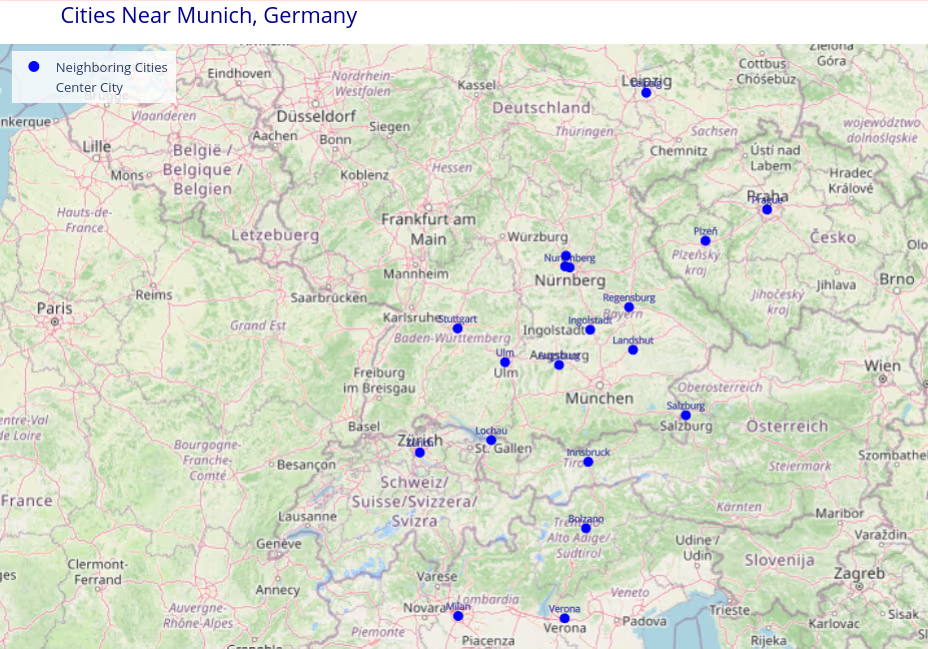
I tried to adjust query results by applying the predicate “country=‘Germany’” in the WHERE clause. On first sight, the result looks ok. However, it ignores the fact that Munich is close to countries like Austria and Czechia and both have qualifying cities.
NAME                                                         COUNTRY                        POPULATION  DISTANCE
------------------------------------------------------------ ------------------------------ ----------- ------------------------
Munich                                                       Germany                            2606021   +0.00000000000000E+000
Nuremberg                                                    Germany                             526091   +2.13090380450457E+000
Augsburg                                                     Germany                             303150   +2.26725912680422E+000
Stuttgart                                                    Germany                            2787724   +2.47995256588007E+000
Regensburg                                                   Germany                             159465   +2.97261354556007E+000
Ingolstadt                                                   Germany                             142308   +2.97790711645387E+000
Fürth                                                        Germany                             132032   +3.31555761161626E+000
Ulm                                                          Germany                             129942   +3.40490381459675E+000
Erlangen                                                     Germany                             117806   +3.46274565636570E+000
Leipzig                                                      Germany                             619879   +3.59975830782204E+000
Landshut                                                     Germany                              75272   +3.61339028640625E+000
Frankfurt                                                    Germany                             775790   +3.70535022195604E+000
Rosenheim                                                    Germany                              65192   +3.74132320060203E+000
Würzburg                                                     Germany                             128246   +3.80443740624146E+000
Chemnitz                                                     Germany                             250681   +3.81440066178152E+000
Kempten                                                      Germany                              70056   +3.85022296238472E+000
Reutlingen                                                   Germany                             118528   +3.90280944423094E+000
Karlsruhe                                                    Germany                             309964   +3.91768644328843E+000
Dresden                                                      Germany                             566222   +3.93704990214691E+000
Heilbronn                                                    Germany                             130093   +3.94597627841490E+000

  20 record(s) selected.
The power of SQL? Use BETWEEN with percentage
Instead of encoding population in the vector, maybe it could be considered in a more traditional predicate? How could I express the search criteria to only consider neighboring cities of similar size? One way could be to apply the BETWEEN predicate with a percentage range for the population. Here is the SQL statement for a range within +/- 20% the size of Munich’s population.
select name,
       country,
       population,
       vector_distance((select coord from cities where name='Munich'),
                       coord,
                       euclidean) as distance
from cities
where (select population from cities where name='Munich') between population*0.8 and population*1.2
order by distance
limit 20;
The query returns the following, maybe surprising result:
NAME                                                         COUNTRY                        POPULATION  DISTANCE
------------------------------------------------------------ ------------------------------ ----------- ------------------------
Munich                                                       Germany                            2606021   +0.00000000000000E+000
Stuttgart                                                    Germany                            2787724   +2.47903647478988E+000
Vienna                                                       Austria                            2223236   +4.79802206189633E+000
Hamburg                                                      Germany                            2496600   +5.63699956816997E+000
Rome                                                         Italy                              2748109   +6.31004215500355E+000
Birmingham                                                   United Kingdom                     2590363   +1.41598127691243E+001
Algiers                                                      Algeria                            2364230   +1.42167799104080E+001
Bucharest                                                    Romania                            2412530   +1.49938656038498E+001
Athens                                                       Greece                             3059764   +1.58362674261946E+001
İzmir                                                        Turkey                             2965900   +1.83493615311709E+001
Kyiv                                                         Ukraine                            2952301   +1.90888905608648E+001
Bursa                                                        Turkey                             3101833   +1.92001279810137E+001
Konya                                                        Turkey                             2320241   +2.32947708743434E+001
Casablanca                                                   Morocco                            3215935   +2.40898978805504E+001
Beirut                                                       Lebanon                            2421354   +2.78467879825984E+001
Damascus                                                     Syria                              2584771   +2.87302901819551E+001
Ouagadougou                                                  Burkina Faso                       3063271   +3.80931722447174E+001
Omdurman                                                     Sudan                              2805396   +3.85949018415254E+001
Mecca                                                        Saudi Arabia                       2427924   +3.88820763462854E+001
Baku                                                         Azerbaijan                         2300500   +3.90413674447026E+001

  20 record(s) selected.
Conclusions
My experiments clearly show that an approach of “just encode, then query” do not work well (Hello, vibe coders!). When designing the vector or choosing an embedding model, it requires careful selection and quality control. What also became clear is that storing vectors and traditional relational data side by side is quite powerful. By combining similarity search with regular SQL predicates on other columns, I was able to built more tailored queries and to tune results.
If you have feedback, suggestions, or questions about this post, please reach out to me on Mastodon (@data_henrik@mastodon.social) or LinkedIn.
