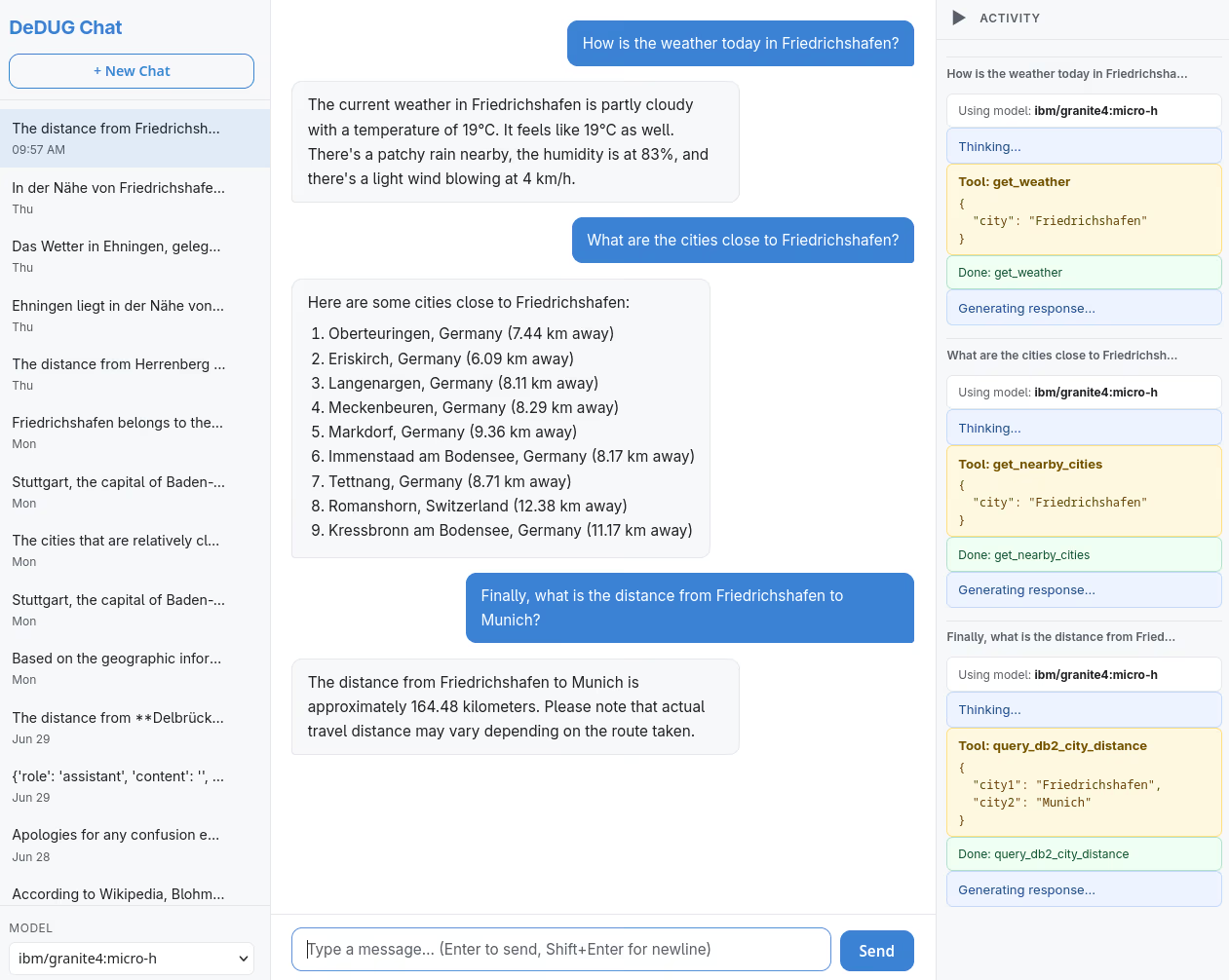
Last week, as a conference talk, I gave a live demo of my so-called “Db2 chat” (see screenshot above). It is a web-based chatbot to converse with an AI model. Within the chat and by the help of tool calling, it is possible to retrieve weather information for a provided location, or obtain nearest cities and distance information. For the latter, the AI model and runtime reach out to Db2 and my Db2 geo search database.
How does it work and how did I code that AI application? Here are some details and the links to the code on GitHub.
Tool calling: AI chatbot says hello to Db2
Large language models and other AI models are limited in their knowledge. They are pretrained with data up to a certain date. RAG (retrieval-augmented generation) was the first technique to dynamically incorporate data into the context and make answers more relevant. Tool calling is a more low-level and maybe more directed form of bringing in data (and other things) into the current context. The IBM Think topic on tool calling states:
Tool calling refers to the ability of artificial intelligence (AI) models to interact with external tools, application programming interfaces (APIs) or systems to enhance their functions. Instead of relying solely on pretrained knowledge, an AI system with tool-calling capabilities can query databases, fetch real-time information, execute functions or perform complex operations beyond its native capabilities. Tool calling, sometimes referred to as function calling, is a key enabler of agentic AI. It allows autonomous systems to complete complex tasks by dynamically accessing and acting upon external resources.
For the chatbot, I created some tools related to my Db2 database and made them known to the AI. When you look at the screenshot on top, you may notice three status boxes with yellow background and the following tools:
- get_weather: Retrieve forecast data from a weather service for a given city.
- get_nearby_cities: Fetch data on nearby cities from a Db2 database by executing a SQL query.
- query_db2_city_distance: Execute a SQL query in Db2 to compute the distance for two cities.
The above and more tools are defined in a configuration/initialization file. They state the tool name, purpose (a short description), and what kind of parameters are needed. Thus, the AI model can decide if a tool could be called. The tools themselves are implemented in different files. You can find my Db2 tools in db2.py. Each tool is a rather short Python function. The functions define a template for a SQL query, fill in parameters, then execute the SQL statement and retrieve the data.
It’s a relatively simple and quick way of incorporating Db2 database data into AI applications. The following Python function (tool) is all what is needed to turn the input of a city name into a list of nearby cities with distance in kilometers.
def get_nearby_cities(city: str, limit: int = 10) -> dict:
    """Return the *limit* closest cities to *city* using vector distance + haversine."""
    escaped_city = city.replace("'", "''")
    sql = (
        "SELECT name, country, distance_km FROM ("
        "  SELECT a.name, a.country,"
        "         haversine(a.lat, a.long, b.lat, b.long) AS distance_km"
        "  FROM cities a, cities b"
        f" WHERE b.name = '{escaped_city}'"
        "  ORDER BY vector_distance(b.coord, a.coord, euclidean)"
        f" FETCH FIRST {limit} ROWS ONLY"
        ")"
    )

    conn = get_connection()
    statement = ibm_db.exec_immediate(conn, sql)
    if statement is False:
        return {"error": _stmt_error()}

    _, rows = _fetch_all(statement, limit=limit)
    if not rows:
        return {"error": f"No data found for city '{city}'"}

    return {
        "center_city": city,
        "nearby_cities": [
            {
                "name": r["NAME"],
                "country": r["COUNTRY"],
                "distance_km": r["DISTANCE_KM"],
            }
            for r in rows
        ],
    }
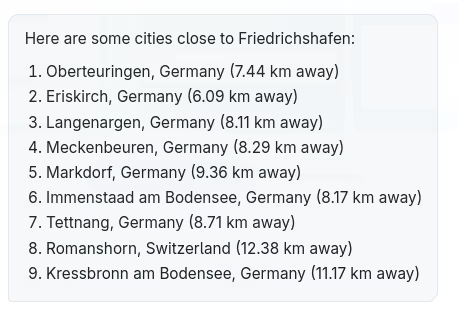
The AI model can turn the function result into an output like this:
(Agent) SKILL needed: Your guidelines as Markdown file
To develop the chatbot, I used IBM Bob. It is a so-called AI-powered development partner and assists throughout the entire software development lifecycle process. First, I prepared a specification for the chatbot, describing desired features, the technologies and tools to use, and other details. Then, as next step, I handed it over to IBM Bob to turn this into a detailed project plan with steps (to-do list). I refined that plan in dialogue with the AI-powered tool. Eventually, I gave the “go” to work on plan step-by-step and to generate the code.
There was also other input from me - not as part of the project specification, but as guideline for the coding. It is a Db2 Python skill that I created a while ago. A skill or agent skill is a single “SKILL.md” file or such a file with additional references and examples in other files (see the specification). The skill guides “the AI” (and its agents performing the actual tasks like coding). In my case, the Db2 Python skill defines which API and interfaces to use, how to handle credentials, where to find documentation and code samples to learn about best practices, and how I would like to organize “things”.
Skills help to stay focused on the actual project, to define extra guardrails in where to go, cut unnecessary spending (tokens, money, time, …). Skills extend the AI tools with knowledge and may add new workflows. In the case of my chatbot project, the Db2 Python skill made sure that IBM Bob knew what type of Python code I wanted to query Db2.
Conclusions
One of the discussions I run into is whether tools like IBM Bob or Anthropic’s Claude will replace me. I made the decision to use such a tool, enhanced the tool by adding the right skill, I came up with the idea and the project specification, I drove the refinement of the project plan, and I wrote the SQL queries and handed them in to integrate them into the code. I also made sure that I “own” the project and code. By my technology choices I made sure that I understand the architecture and the implementation and that I can maintain and extend the code. I am the expert - do you agree?
- GitHub repository with Agent skills for Db2 and Python/Rust
- GitHub repository with code for “Db2 chatbot”
If you have feedback, suggestions, or questions about this post, please reach out to me on Mastodon (@data_henrik@mastodon.social) or LinkedIn.
