DESCRIBE command
The past days, I have been looking into a problem with SQL statements. It runs into errors depending on some input values. Thus, it required some debugging, including the use of the good, old DESCRIBE command. Isn’t there a saying that if you can describe the problem, you are closer to the solution…?
If you have never used DESCRIBE, here is a short introduction. You can use the DESCRIBE command on queries, including XQueries and procedure calls, on tables and views. The output is the metadata like columns of the (result) table, index information, or data partitions of tables. Given the SAMPLE database and its PRODUCT table, here are some examples.
First, I describe the table and it returns its column names, data types and their length, and other information.
db2 "describe table product"

                                Data type                     Column
Column name                     schema    Data type name      Length     Scale Nulls
------------------------------- --------- ------------------- ---------- ----- ------
PID                             SYSIBM    VARCHAR                     10     0 No
NAME                            SYSIBM    VARCHAR                    128     0 Yes
PRICE                           SYSIBM    DECIMAL                     30     2 Yes
PROMOPRICE                      SYSIBM    DECIMAL                     30     2 Yes
PROMOSTART                      SYSIBM    DATE                         4     0 Yes
PROMOEND                        SYSIBM    DATE                         4     0 Yes
DESCRIPTION                     SYSIBM    XML                          0     0 Yes

  7 record(s) selected.
Moreover, I can ask for information on indexes defined on a table. The following shows the indexes on PRODUCT, including different XML index types.
db2 "describe indexes for table product"

Index                           Index               Unique         Number of      Index                       Index          Null
schema                          name                rule           columns        type                        partitioning   keys
------------------------------- ------------------- -------------- -------------- --------------------------- -------------- ------
SYSIBM                          SQL261007075750500  D                           - XML DATA - REGIONS          -              Y
SYSIBM                          SQL261007075750770  U                           1 XML DATA - PATH             -              Y
DB2INST1                        PK_PRODUCT          P                           1 RELATIONAL DATA             -              Y
DB2INST1                        PROD_NAME_XMLIDX    D                           1 XML DATA - VALUES LOGICAL   -              Y
SYSIBM                          SQL261007075755990  D                           1 XML DATA - VALUES PHYSICAL  -              Y
DB2INST1                        PROD_DETAIL_XMLIDX  D                           1 XML DATA - VALUES LOGICAL   -              Y
SYSIBM                          SQL261007075756060  D                           1 XML DATA - VALUES PHYSICAL  -              Y

  7 record(s) selected.
There are more ways to use DESCRIBE, as discussed in the following.
DESCRIBE with ADMIN_CMD
Because DESCRIBE is a command and not a SQL statement, you cannot directly run it in true SQL environments. Thus, when I am in an IDE like IBM Bob with the Db2 Developer Extension (see my post Getting started: IBM Bob and Db2 Developer Extension combined for an introduction), the I need the ADMIN_CMD procedure as a wrapper. There is even dedicated documentation DESCRIBE command using the ADMIN_CMD procedure.
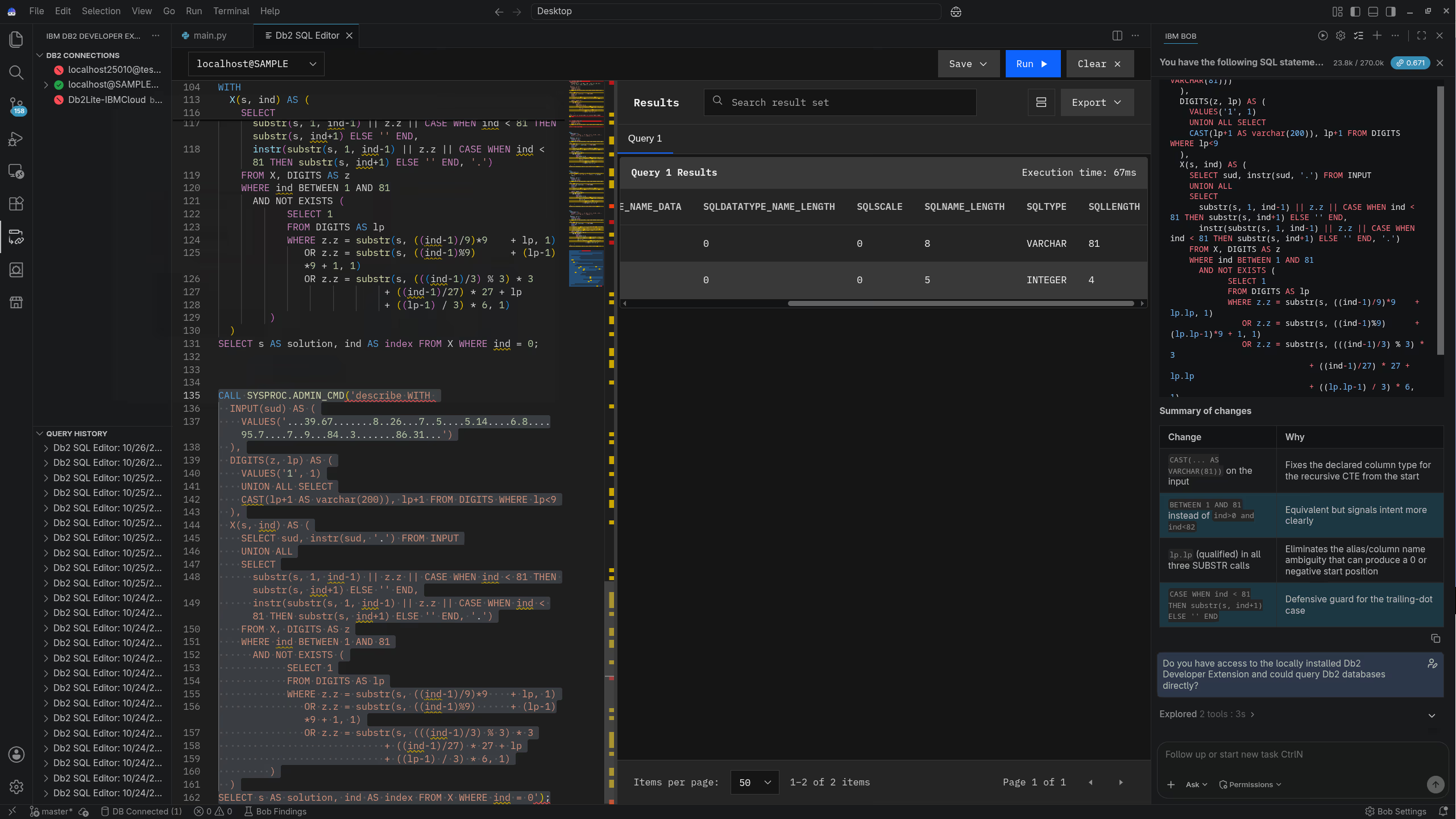
The following shows the SQL statement that I ran to look into the actual problem. It is a CALL to ADMIN_CMD with the embedded DESCRIBE of a recursive query (solving a Sudoku).
CALL SYSPROC.ADMIN_CMD('DESCRIBE WITH
  INPUT(sud) AS (
    VALUES('...39.67.......8..26...7..5....5.14....6.8....95.7....7..9...84..3.......86.31...')
  ),
  DIGITS(z, lp) AS (
    VALUES('1', 1)
    UNION ALL SELECT
    CAST(lp+1 AS varchar(200)), lp+1 FROM DIGITS WHERE lp<9
  ),
  X(s, ind) AS (
    SELECT sud, instr(sud, '.') FROM INPUT
    UNION ALL
    SELECT
      substr(s, 1, ind-1) || z.z || CASE WHEN ind < 81 THEN substr(s, ind+1) ELSE '' END,
      instr(substr(s, 1, ind-1) || z.z || CASE WHEN ind < 81 THEN substr(s, ind+1) ELSE '' END, '.')
    FROM X, DIGITS AS z
    WHERE ind BETWEEN 1 AND 81
      AND NOT EXISTS (
            SELECT 1
            FROM DIGITS AS lp
            WHERE z.z = substr(s, ((ind-1)/9)*9 + lp, 1)
               OR z.z = substr(s, ((ind-1)%9) + (lp-1)*9 + 1, 1)
               OR z.z = substr(s, (((ind-1)/3) % 3) * 3
                                + ((ind-1)/27) * 27 + lp
                                + ((lp-1) / 3) * 6, 1)
         )
  )
SELECT s AS solution, ind AS index FROM X WHERE ind = 0');
The output and the overall scenario is shown in the screenshot at the top.
Conclusions
Describe your problem with details to better understand it and find a solution. In my case, it helped, too. And I will talk about it at the upcoming 50th meeting of the German Db2 User Group (DeDUG) (you need to have a free IDUG account to access that link). And maybe it will also be a talk next year at IDUG EMEA 2027.
If you have feedback, suggestions, or questions about this post, please reach out to me on Mastodon (@data_henrik@mastodon.social) or LinkedIn.
