Recently, I had to debug a “SQL puzzle”. From time to time, some recursive query was failing. The query, somehow, ran into “out of range” errors:
SQL0138N The statement was not executed because a numeric argument of a scalar function is out of range. SQLSTATE=22011
SUBSTR function
But how to find the root cause? After some investigation, everything pointed to SQL substring processing. The query was using SUBSTR. The documentation for SUBSTR mentions the SQLSTATE in question and the error type (see the “length” parameter):
The value of the integer must be in the range of 0 to n, where n equals (the length attribute of string in string units) - start + 1 (SQLSTATE 22011 if out of range).
As the name implies, SUBSTR returns a substring of a string. But how to address the issue? There could be an “IF THEN ELSE” or “CASE” added. But it would make the query even more complex. Or could the logic be changed?
SUBSTRING to the rescue
It turned out, that there is a functional equivalent in Db2, SUBSTRING. Looking into it, SUBSTRING has a different syntax. More importantly, it has slightly different semantics in how it handles the length parameter:
The value must be greater than or equal to zero. If a value greater than n is specified, where n is the (length attribute of expression) - start + 1, then n is used as the length of the resulting substring.
SUBSTR vs. SUBSTRING semantics
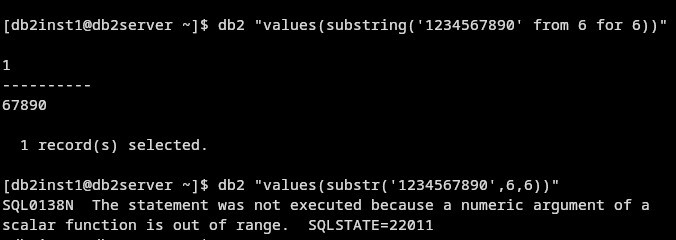
Some quick tests confirm the subtle differences in semantics:
values(substr('1234567890',6,6))
It results in the following error mesage:
SQL0138N The statement was not executed because a numeric argument of a scalar function is out of range. SQLSTATE=22011
The above is the expected result, as encountered in the original query.
Running the same test with SUBSTRING
values(substring('1234567890' from 6 for 6))
ignores the “out of range” and returns the desired substring:
1
----------
67890

  1 record(s) selected.
Conclusions
Db2 has a long list of SQL functions, many of them for the same purpose. It is worth to understand the semantic differences. Sometimes, just by replacing one for the other solves the issue. In the case of the complex query, switching from SUBSTR to SUBSTRING solved the issue.
If you have feedback, suggestions, or questions about this post, please reach out to me on Mastodon (@data_henrik@mastodon.social) or LinkedIn.
